


How to customize desktop

Customize Your Desktop
Every individual wants that their desktop should be arranged in a way they want it to be,and not the way microsofts os arranges them.
So here i am with a small tutorial,on how you can easily customize your desktop,by using some of the free tools and the .net framework.
How to install .net framework is discussed in the previous pages,if you haven't installed .net yet,please go through the previous post and install it.
Now without further delay,lets start customizing our desktops
step1:Install the .net framework 3.0 or 3.5
step2:Download fence from the link given below,the name of the software is fence
Download Fence
step3:Download Rocket dock,search it on google and you will find the download link
step4:Install Rocket dock and Fence
step5:Download some hd wallpapers and your done,fence is easy to use,just follow the procedure
and you will have an amazing looking desktop
Note:The best part is it doesnt degrade your computer speed
For more information,watch this Fencevideo
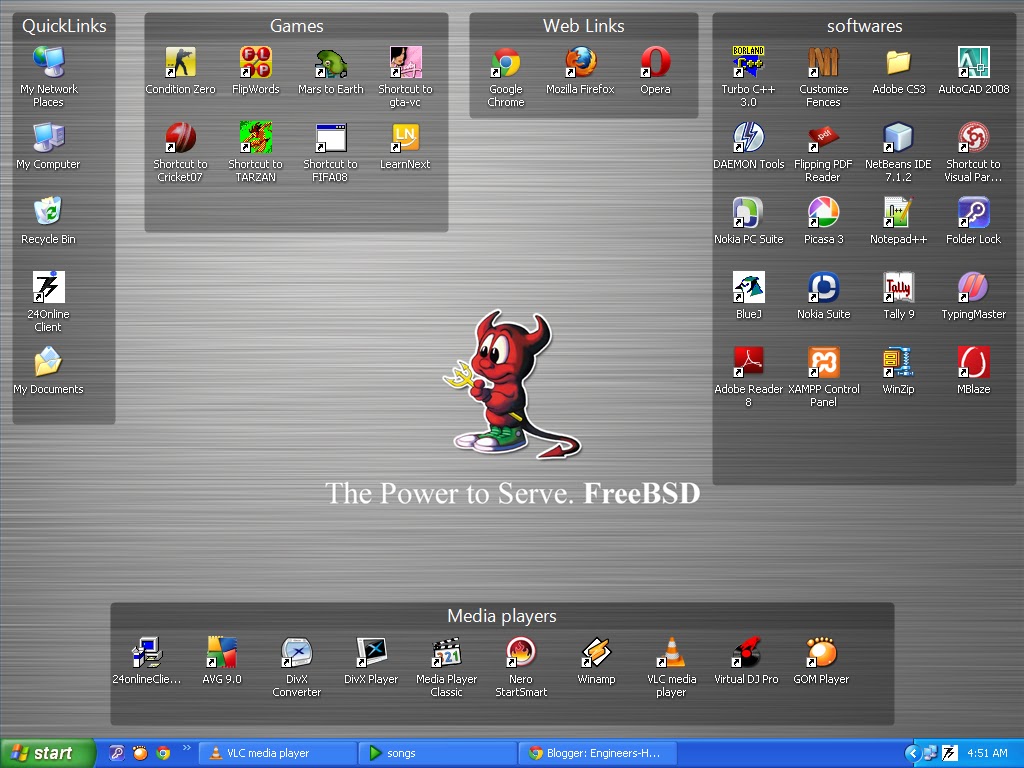
Here is a snapshot of how by using fence i have arranged my desktop.All your valuable comments are most welcome,if their is any query regarding this,please feel free to post it over here.
.net framework
DOWNLOAD COMPLETE MICROSOFT .NET FRAMEWORK 3.5 SETUP

If you go to Microsoft download center, then by default you will get live installer of approximately 2-3 MB’s while complete .NET framework requires 50-200 MB. Actually on the same page there are links to complete setup but they are placed in a way that anyone can hardly notice them. Seems like Microsoft wants you to download live installer but there are problems with live installer…
- It may hang forever if you have slow internet connection like dial-up, GPRS, etc.
- You can not use it at all if your computer is not connected to internet
- Also if you are running pirated Windows better not to use any software/installer from Microsoft which connects to Internet.
Here I am giving you links to complete Microsoft .NET Framework 3.0 & 3.5 setups which are gathered from Microsoft pages (links: v3.5 & v3.0)
# Microsoft .NET Framework 3.5 Setup
- 32bit version (size:-200mb)(Recommended)
# Microsoft .NET Framework 3.0 Setup
- 32bit version(size:-50mb)
- 64bit version(size:-90mb)
Do not worry about authenticity of above links as they are from Microsoft’s server!
ppt on microprocessors
Powerpoint presentation on microprocessors
Some of the snapshots are given below,if u like them then download the ppt,i hope it helps you all


DOWNLOAD
VLC media player for Android
VLC media player for Android beta is now
available for download


Naturally being in beta, the app might be unstable at times, although most of the early
feedback is positive.Mind you, it’ll run only on devices with an ARMv7 processor,
which supports the NEON engine. The player comes with a nice widget that allows you to
play, pause and stop any music track you might be playing with it.At this stage all but the
cheapest Droids have a qualifying CPU,but if yours isn’t on the list you’d be glad to know that
an ARMv6-loving
version is also in the works. There’s also going to be a tablet-friendly
release of the VLC player for Android. Follow the source link below to get the VLC player beta
and don’t forget to share your first impressions on it with the rest
of us in the comments section below.
To download the vlc for android please click on download below:-
Angry birds on xbox,ps3 and nintendo
Angry Birds to hit Xbox 360, PS3 and
Nintendo 3DS later this year


New Angry Birds versions that are being “built from the ground up”
will hit the Xbox 360, PlayStation 3 and Nintendo 3DS in the holiday
season.
The game will be distributed physically on discs (Xbox 360,
PlayStation 3) and a 3DS cartridge. There is no info on the pricing just
yet.
The console Angry Birds offerings will include the original Angry
Birds game, Angry Birds Seasons and Angry Birds Rio. It is yet unknown
if the game will pack all the levels available on iOS and Android.
The fact that Rovio rebuilt the game from scratch for the consoles
allowed the devs to include animated backgrounds, new and better
effects, HD (and probably Full HD) resolution support, etc. MS Kinect,
PS3 Move and 3DS StreetPass support is going to be included as well.
There will be new leaderboard and achievements system as well as individual score charts for each level.
Angry Birds for consoles is coming this holiday season.
Notepad Tricks: Cool Notepad tricks for Windows
Notepad Tricks: Cool Notepad tricks for Windows
Notepad, the text editor that comes bundled in Windows is an excellent tool for text editing. But that is not the only thing for which notepad is famous. It is also famous for its tricks and hacks. Here is a roundup of some of the best and coolest tricks that you can try using Notepad.

Matrix Falling Code Effect - Notepad CMD (.BAT) Tricks
Inspired by the movie Matrix, this falling code trick is extremely popular on social networking websites. Copy and paste the code given below in Notepad and save the file as "Matrix.bat" or *.bat.
Upon running the bat file, you will see the "Matrix falling code" effect.
Create a Harmless Funny Virus with Notepad-Continuously eject CD/DVD drives
This VBS trick will create a code which will continuously eject all your connected Optical drives. If you put them back in, it will pop them out again. Copy this code and paste it in Notepad as Virus.vbs or *.vbs.Double click to open this file and you will be impressed by this awesome trick.
To close any of the VBS trick given, open task manager and close the wscript.exe process. These tricks work onWindows 7, Windows Vista and Windows XP.
Make a Personal Diary(Log) with Notepad (Easter Eggs)
 |
| Notepad Diary |
All these Notepad tricks are totally harmless and would not harm your PC in any way. To close any of the VBS trick given, open task manager and close the wscript.exe process. These tricks work onWindows 7, Windows Vista and Windows XP.
Watch ASCII Star Wars in Windows XP, Vista and 7
Watch ASCII Star Wars in Windows XP, Vista and 7
Every one of us has watched Star Wars on television, computer or in a theater. It is the same movie with aliens fighting each other for galaxies and such stuff. There is nothing new in it. But wait, have you watched an ASCII( American Standard Code for Information Interchange) version of Star Wars and that too in Windows using telnet. Well if you have not, then you must do it now!
There is a complete copy of Star Wars done entirely in ASCII characters that you can watch in theWindows operating system (or any OS that supports telnet). The only thing required to watch it is an internet connection; speed does not matter.
There is a complete copy of Star Wars done entirely in ASCII characters that you can watch in theWindows operating system (or any OS that supports telnet). The only thing required to watch it is an internet connection; speed does not matter.

To watch it on Windows XP,
- Go to Start, Run.
- Now type "telnet towel.blinkenlights.nl" without the quotes and press Enter.
On Windows 7 and Windows Vista
Telnet is turned off by default in the latest versions of Windows. So, in order to watch star wars, you must first enable telnet by going to Control Panel › Programs › Turn Windows Feature On or Off and ticking both the telnet check boxes. After doing that, follow the steps given below:-
- Go to Start, Search.
- Type telnet and press Enter.
- In the following command prompt window, type "o" without quotes and press Enter.
- Now type "towel.blinkenlights.nl" without the quotes and press Enter.
A command prompt window like the one in the image will open with the movie being played in it. See the movie yourself. Did you enjoy watching this new version of Star Wars? Well, I did and know it for sure that you would have too.
Notepad tricks
Notepad Tricks and Tips
With these tricks, you will be able to find out the tricking ability of Microsoft Notepad. But before that, do you know:-
Trick/Answer 1
The number of flight that attacked the World Trade Centre was Q33N. You might ask what is the trick in that. We could have searched it on the net in an instant. But this is not the trick. The trick starts now:-
- The number of the flight that attacked World Trade Centre?
- How much control the President of United States has over Microsoft?
- How worried Microsoft is about their reputation?
Trick/Answer 1
The number of flight that attacked the World Trade Centre was Q33N. You might ask what is the trick in that. We could have searched it on the net in an instant. But this is not the trick. The trick starts now:-
- Open Notepad.
- Type in Q33N.
- Change the font size to 72 by clicking on Format and selecting Font in the Menu Bar.
- Also select Wingdings as your Font.
- Click on OK to see the trick.

Trick/Answer 2
Well the President of United States is undoubtedly one of the most powerful man. No one dares to test it. But now that Bush is no longer the President, .........we would. To test his authority over Microsoft, follow the steps given below:-
Well the President of United States is undoubtedly one of the most powerful man. No one dares to test it. But now that Bush is no longer the President, .........we would. To test his authority over Microsoft, follow the steps given below:-
- Open Notepad.
- Type in "bush hid the facts" without quotes.
- Save the notepad file as test.txt or *.txt.
- Reopen the file to know the results.
Well, most people think reputation is everything and the top brains at Microsoft are no different. To test their reputation building scheme, try the steps given below:-
- Open Notepad.
- Type in "this app can break" without quotes.
- Save the notepad file as test.txt or *.txt.
- Reopen the saved file to know the results.
Try these notepad tricks yourself to know the results.
On a serious note, none of the flight that attacked World Trade Center had the flight number Q33N. It is just a rumor which became popular due to its peculiar nature. Moreover, did you notice some similarity in trick 2 and 3? Yes, you figured it out correctly, both of the statements have the word length pattern of 4,3,3,5 which seems to cause the bug. It is not that Microsoft is that much 'worried' about their reputation or the U.S. President have absolute control over Microsoft.
Note: The last two tricks work on all versions of Windows but these tricks are computer specific and might or might not work on some systems running later versions of Windows after XP.
Subscribe to:
Posts (Atom)
